JavaScript SEO Advice Was Written for Googlebot. AI Crawlers Are Not Googlebot.
If Google renders JavaScript without trouble, why do AI assistants describe your premium calculator wrongly, or skip its numbers?


Every piece of JavaScript SEO guidance you have read assumes a crawler that fetches your page, queues it for rendering, runs your bundle, and indexes what the browser produced. Googlebot does that. It has done it for years, which is why the advice settled into "Google handles JavaScript, stop worrying".
The crawlers feeding AI answers are a different set of systems with different economics. A question-time fetch has a budget measured in seconds, and the cheapest correct behaviour for a retrieval system is to take the HTML the server returned and move on. Whether a given agent runs your bundle is a per-vendor, per-layer question with no single answer.
Which would be a minor technical footnote, except for where it lands. In banking, lending and insurance, the highest-intent content on the site is almost always the client-rendered part. The premium calculator. The eligibility checker. The quote flow. The rate table that populates after a call returns. Those are the pages a buyer is sent to and the pages an assistant most needs to read correctly.
What we measured
We pulled the served HTML of fourteen insurance, lending and investing product pages across India, the United States and the United Kingdom on 23 September 2026, and looked at what arrived before any JavaScript executed.
Indian insurance pages are heavier than you would guess
The assumption that Indian BFSI sites are thin did not survive contact with the data.
| Page | Words in served HTML | Tables |
|---|---|---|
| Policybazaar, term insurance | 15,937 | 13 |
| HDFC ERGO, health insurance | 18,772 | 5 |
| Acko, car insurance | 10,626 | 3 |
| Progressive, auto | 3,472 | 0 |
| GEICO, auto | 2,213 | 0 |
| Policygenius, life | 1,672 | 0 |
The Indian pages served five to ten times the readable text of their American equivalents, and they used tables where the American pages used none. Whatever else is true, these are not empty shells waiting on a bundle.
The client-rendered part is the part that converts
Three of the pages we pulled carried markers of client-side frameworks: Acko, Groww and BankBazaar.
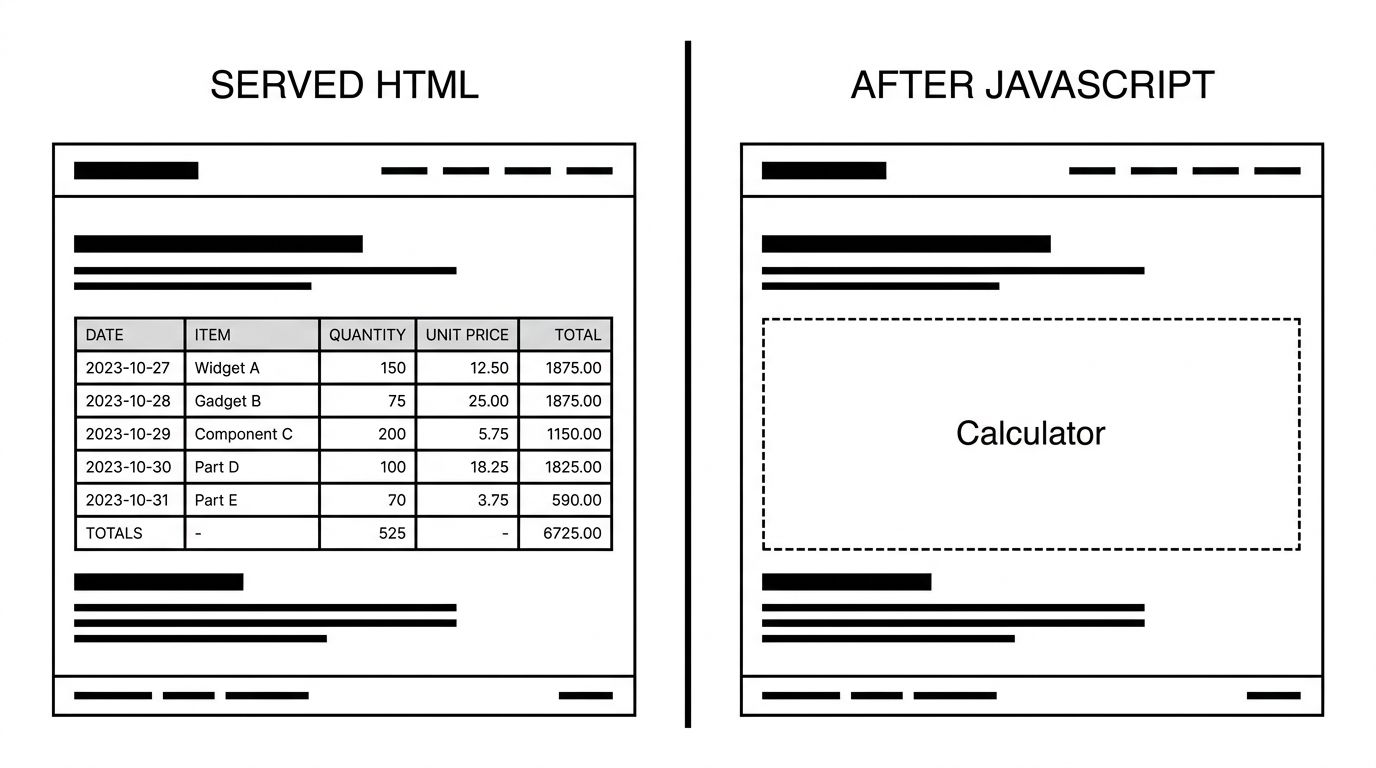
What sits behind those markers matters more than the count. The marketing copy tends to arrive server-rendered. The interactive machinery does not. A SIP calculator that computes a projection, a premium estimator that responds to age and cover amount, an eligibility checker that asks four questions before returning a number. Those exist only after execution.
So a retrieval system taking the served HTML gets your explanation of what term insurance is, in full, and none of your actual numbers.
Two sites refused the request entirely
Compare the Market and MoneySuperMarket returned a challenge rather than a page, serving 185 and 83 words respectively to a standard desktop user agent.
Both are among the most sophisticated files in our robots.txt sample, naming twelve and ten AI agents respectively. So their declared policy is careful and their edge behaviour is stricter than the declaration. Whether that is intended is a question only they can answer, but a retrieval agent hitting that wall does not read the robots.txt first and conclude anything nuanced. It gets a challenge page and moves on to a competitor.
The gap between what your server sends and what a customer eventually sees is where the problem lives. The diagram below shows the same page in both states.
Why the retrieval layer behaves differently
Rendering is expensive and the budget is not the same
Executing a page costs orders of magnitude more than fetching it. Google absorbs that cost because rendering the web is the business.
A retrieval system assembling an answer in real time has a different constraint. The user is waiting. Several sources are being fetched in parallel. A page that needs a headless browser and three seconds to reveal its content competes against a page that gave up its content immediately.
Even where the capability exists, it is not obviously in the system's interest to use it on every fetch.
The layers do not share a renderer
A crawler collecting training data, a crawler maintaining a retrieval index, and an agent fetching one URL at question time are separate systems with separate infrastructure.
Assuming that because one of a vendor's agents handles JavaScript they all do is the same category error as assuming that because Googlebot renders, every crawler does. Vendor documentation is the place to check, and it changes.
The answer can be assembled without you
This is the part that makes it a commercial problem rather than a technical one.
If your rate table never materialises for a retrieval agent, the assistant does not report that your rates are unavailable. It answers the question using an aggregator, a comparison site or a forum thread that stated a number in plain HTML. Often that number is stale. Sometimes it was never right.
You have not been left out. Your figures have been replaced by somebody else's account of your figures.
Rendering is only the first way content hides
Execution is the headline failure, and it is not the only one. Three related patterns produce the same outcome, and finance sites use all three heavily.
Content behind interaction. Cover details and exclusions tucked into accordions or tab panels. Whether a crawler reads them depends on how the panel is built. Collapsed by CSS, the text is usually present in the HTML. Injected on click, it is not there at all.
Content that loads on scroll. Fee schedules and fine print deferred until an intersection observer fires. A crawler that never scrolls never triggers it.
Facts that only exist in a linked document. The policy wording PDF carries the exclusions while the HTML page carries the marketing. Whether the PDF is retrieved and parsed is a separate question from whether the page was.
The common thread is that the most consequential text on a financial page, the part describing what is actually covered and what it costs, is routinely the part shipped through the least reliable channel.
The credential problem hiding inside the rendering problem
There is a quieter version of this that regulated firms should check.
Registration numbers, licence details and disclosure text often live in a footer component that hydrates with the rest of the application. If that footer is client-rendered, the single most verifiable trust signal the firm possesses is invisible to any agent that does not execute.
A firm can spend a quarter building author pages and structured credentials, and ship all of it inside a bundle. The work is real and no machine reader ever sees it.
What to do about it
Read your own page the way a crawler does
Fetch your most commercially important URL with `curl` and read what comes back. No browser, no extension, no rendering.
``` curl -sL https://www.example.com/car-insurance/ | wc -w ```
If the number is small, or if the figures a customer needs are absent, that is what a non-rendering retrieval agent has to work with. This takes a minute and tells you more than any audit tool.
Separate the tool from the facts it produces
The instinct is to server-render the calculator. Usually that is the wrong fix and an expensive one, because the calculator is genuinely interactive.
The better move is to stop making the interactive widget the only place the facts exist. A premium calculator can stay client-side while the page also carries a server-rendered table of representative premiums for common ages and cover amounts, or a worked example in prose with the actual numbers in it.
The customer still gets the tool. The crawler gets something quotable. Nobody has rebuilt anything.
Put the numbers in text, not only in the widget
Whatever a buyer would want to know, state it in server-rendered text somewhere on the page. Typical rates. Coverage limits. Fees. Eligibility thresholds.
If a figure is important enough to compute, it is important enough to also state.
Check your edge security is not the real crawler
Before rebuilding anything, confirm the page is reachable at all. Bot protection that challenges non-browser user agents will turn a perfectly server-rendered page into an empty one from a crawler's point of view. Two of the fourteen pages we pulled were in that state, and our AI crawler checker covers which agents are getting through.
Give the important facts a stable home
A useful discipline: for every number a customer might ask an assistant about, there should be one location on your site where that number appears in server-rendered text, in a sentence that names what it is.
"Full cover for a 35-year-old in Delhi typically starts around X per year" is quotable. A figure that materialises in a widget after four inputs is not, however accurate it is.
This is also the cheapest form of insurance against being misquoted, because a retrieval system offered a clear statement from the brand will generally prefer it to a number scraped from a forum.
Test the whole path, not just the homepage
Rendering behaviour varies by template. The homepage is often server-rendered while the product and quote templates are not, and the product templates are the ones that matter.
Pull the served HTML for one URL from each template family: the category page, the product page, the calculator, the comparison table, a policy detail page. Count the words and look for the figures. Ten minutes across five templates will usually find the gap.
Treat it as a rendering problem, not a framework problem
React and Next.js are not the issue. A Next.js page rendered on the server arrives complete. The issue is content that exists only after client-side execution, which is a choice available in any framework and avoidable in most.
We handle this as part of technical GEO and SEO, and it interacts closely with the trust-signal work in our financial services and insurance programmes, since a registration number rendered client-side is a credential no machine reader will ever see.
Decide what genuinely needs to be interactive
Most finance sites carry more client-side machinery than the product requires, because interactivity accumulated one feature at a time and nobody audited the total.
A useful exercise is to list every element on a product page that needs JavaScript and ask what breaks if it arrives as HTML. A comparison table sorted on click can ship sorted by default. A tabbed feature list can ship as sequential sections. A "see more" toggle can ship expanded.
Each of those conversions is small. Together they usually move the majority of a page's substance from the rendered layer to the served layer, and none of them cost a customer anything.
The short version
JavaScript SEO advice that ends at "Google renders it" answers a question nobody is asking any more. The question now is whether the systems assembling AI answers about your products can read your numbers, and for a finance site those numbers are usually the most client-dependent content you publish.
Fetch your own page without a browser. What comes back is your real surface area.