Schema Validation: Valid Markup That Never Gets Read
Your markup passes every validator, so why do AI engines still miss your best answers, and which page actually needs which schema?


We ran the structured data on 25 Indian BFSI pages through a strict JSON parser. Of 102 JSON-LD blocks, 100 parsed cleanly. The two that failed sat on one insurer's health insurance page, and one of them was a 27 KB FAQPage holding 65 buying questions with full answers. That block is the most quotable thing on the page, and no parser that follows the JSON spec can read a character of it. The page still looks perfect in a browser, and most schema checklists would call the site well marked up.
That gap is the whole point of validation, and almost nobody frames it that way. Ask what a machine walks away with after it parses the page: which facts about your company survive, and are they connected to each other? AI engines answer from what survives.
Validation stopped being about rich results
The old reason to validate was eligibility. You added FAQPage, you got the accordion in the search result, you measured the click lift.
Google took most of that away. Since 14 September 2023 the FAQ rich result only appears for well-known, authoritative government and health websites. If eligibility were the only reason to mark up questions, every insurer and bank should have deleted their FAQ markup two years ago.
Almost none of them did, and they were right not to. Google's own documentation still treats the markup as something it indexes and understands even where the visual feature is gone. More to the point, Google's search result is no longer the only consumer. ChatGPT, Perplexity, Gemini and AI Overviews all read pages to build an answer, and structured data is the cheapest, least ambiguous statement of fact a page can offer. Prose has to be interpreted. A FinancialProduct block with a name, a provider and an offer does not.
This is why validation matters more now than it did when rich results were the prize. A rich result either showed or it did not, and you found out within a week. When an AI engine silently drops a malformed block, nothing tells you. Your traffic does not move. Your rankings do not move. You simply stop being the source for a set of answers, and the brand that marked the same facts up properly becomes the source instead.
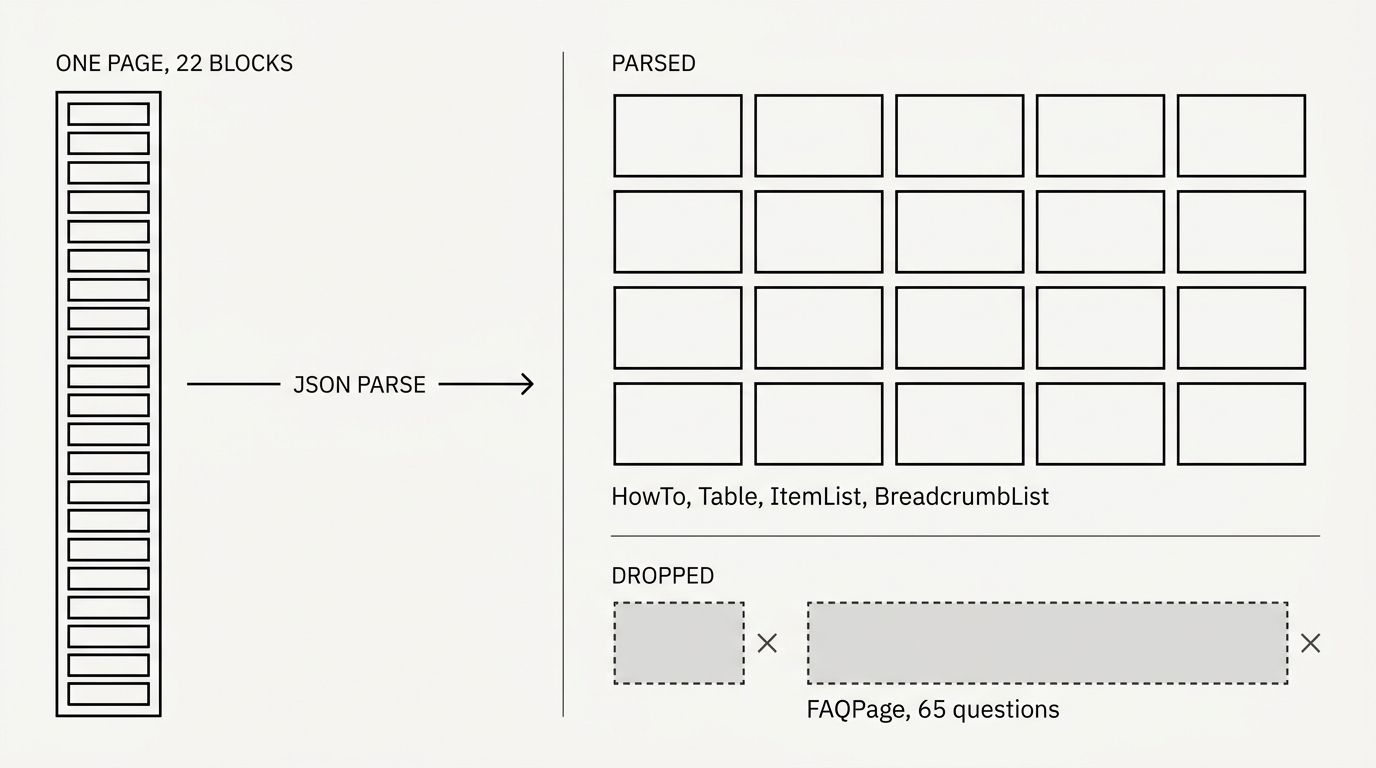
The diagram below shows how one page splits in two once a parser has been through it, and which half held the answers.
The 27 KB block nobody reads
On 31 August 2026, HDFC Ergo's health insurance page carried 22 separate JSON-LD blocks. Twenty of them parse. Two do not, and our own schema validator flags both with the same message: invalid JSON, could not parse this block.
The bigger of the two is the FAQPage. It runs to 26,984 bytes and declares 65 Question and Answer pairs covering exactly what a health insurance buyer asks, including whether a policy covers COVID hospitalisation and whether employer cover is enough on its own. The reason it fails is mundane: 327 of its string values contain a literal line break. JSON does not permit a raw control character inside a string. RFC 8259 section 7 is explicit about it, and a newline has to be written as an escape sequence rather than typed into the value.
So a templating system somewhere dropped multi-line CMS copy straight into a JSON string, and 65 answers stopped existing as far as any parser is concerned. The second broken block is a 9.7 KB navigation list that fails the same way.
None of this is a dig at one insurer. It was the most common shape of failure we found, it is invisible from the front end, and it survives most QA precisely because the content is also present in the page HTML. The markup looks like a bonus layer, so nobody parses it.
Google just removed the safety net
Which brings up the change that prompted this post. On 21 August 2026 Google announced that it changed JSON-LD extraction and now applies only a single pass of HTML unescaping. Gary Illyes pointed people at RFC 8259 for the correct approach.
Before, if your markup contained a double-escaped entity, where & was sitting in the source instead of &, Googlebot unescaped it twice and quietly recovered the character you meant. Now it unescapes once, and you are left with a literal & inside your product name.
We looked for this specific pattern across all 118 blocks in both samples and found zero instances of it. If your markup is hand-built or emitted by a modern CMS, this change probably did not break anything of yours. The reason it still matters is the direction it signals. Google is moving its parser toward the standard and away from guessing what you meant, and a strict parser is exactly what already ate that FAQ block. Google is withdrawing the forgiveness you have been relying on without knowing it, one pass at a time.
The entity graph is the part that compounds
The second finding is the one worth budgeting against. Across the 25 enterprise BFSI pages, only 12 carried an @id anywhere in their markup, and only two used @graph.
@id is what turns a pile of assertions into a graph. Without it, a page that declares an Organization, a FinancialProduct and an AggregateRating has told a machine three unrelated things. Nothing states that the organisation is the provider of the product, or that the rating belongs to that product rather than the site. A human reading the page infers all of it from layout. A parser does not infer, it resolves references, and if there are no references there is nothing to resolve.
The practical effect shows up when an engine has to decide whether the "HDFC Ergo" on your health page is the same entity as the "HDFC Ergo" on your motor page and the one on your LinkedIn profile. Give every important node a stable @id (a canonical URL with a fragment works well), point sameAs at the profiles you control, and reference the same @id from every page. That is a one-time template change that pays out on every page you will ever publish, which is why it beats adding another schema type. The same logic drives how you connect entities through internal links.
Just over half the pages we checked used sameAs, so the identity signal is more common than the linking mechanism. Most sites are naming themselves without connecting themselves.
Not every schema type earns its place
Sprawl is the other habit worth breaking. That same insurance page spent five blocks on HowTo, five on Table and five on ItemList. All fifteen parse. None of them help someone choose a health insurance policy, and the one block that would have, did not parse.
A rough order of priority, based on what engines actually reuse:
- Identity, meaning Organization (or a subtype such as BankOrCreditUnion), WebSite and Person. This is the layer everything else attaches to, and it belongs on every page.
- Commercial, meaning Product, FinancialProduct, LoanOrCredit and the Offer underneath them. This is what gets quoted when someone asks which provider to use.
- Answer-shaped, meaning FAQPage, Question and Answer. No rich result for most sites, still the most directly quotable markup you can write.
- Navigational and decorative, meaning SiteNavigationElement, Table, BreadcrumbList and link-list ItemList. BreadcrumbList earns its keep. The rest is mostly noise you now have to maintain.
If a block would not change the answer an engine gives about your business, it is costing you maintenance and giving you nothing.
Which page takes which schema
Match the schema to the job the page does. The last column lists the specific mistake we saw on that page type in this sample.
| Page type | Primary schema | Must carry | What went wrong in the sample |
|---|---|---|---|
| Homepage | Organization or a subtype, plus WebSite | @id, name, url, logo, sameAs | Named the company, never gave it an @id to reference |
| Product or plan page | FinancialProduct, LoanOrCredit, InsuranceAgency offering | provider referencing the org @id, offers, description | Product declared with no offers and no provider link |
| Ecommerce product page | Product | offers with price and availability, brand, aggregateRating | Offer present, brand and rating left off |
| Category or listing page | ItemList or CollectionPage | itemListElement pointing at real item URLs | ItemList used for navigation menus instead of products |
| Calculator or tool page | WebApplication or SoftwareApplication | name, applicationCategory, provider | Marked up as a generic Organization page, tool never described |
| Article or blog post | Article or BlogPosting | author as a Person with @id, publisher, dateModified | Author present as a plain string, not a linkable entity |
| FAQ or help page | FAQPage | Question and Answer pairs, properly escaped strings | 65 questions lost to invalid JSON |
| Branch or office page | LocalBusiness subtype | address, geo, openingHours, parent org @id | Contact details in HTML only, absent from markup |
Two rules cut across the table. Every page gets the identity layer plus one page-specific type, not eight. And every type you add has to reference the entity graph, or you have added another island.
Should you let a plugin write it?
I expected the data to say no. It said the opposite, and clearly enough that I am not going to pretend otherwise.
We ran a second sample of 11 pages from smaller Indian personal-finance sites, all on WordPress, half of them running Yoast. They averaged 1.5 JSON-LD blocks per page against 4.1 for the enterprise BFSI set. They used @graph on 55% of pages against 8%. Not one block failed to parse. The plugin tier produced tidier, better-connected markup than in-house engineering teams at some of India's largest financial brands.
That is not an argument for installing a plugin and forgetting about it. The risks are real, they are just more specific than "plugins are sloppy":
- Two systems both write the graph. A theme emits an Organization, the SEO plugin emits another, and now the page asserts two versions of who you are with no shared @id. This was the pattern behind most duplicate blocks we saw.
- Two layers escape the same field. A plugin HTML-escapes a field, the template escapes it again on output, and you get the double-escaped entity Google stopped repairing on 21 August.
- Types you cannot defend. Plugins will happily emit ratings or types the page does not support. That is a policy problem, not a parsing one.
One system owns the graph. Whatever writes it, validate the output rather than trusting the settings screen.
Two checks worth running today
Neither of these needs a developer.
- Parse every block. Open the page source, copy each application/ld+json block, and paste it into any JSON validator. If it does not parse, the content in it does not exist to a machine, whatever a rich-results test tells you about the rest of the page. Anyone comfortable in a browser console can do the same by running the block through JSON.parse.
- Check what the parse leaves behind. Our free schema validator takes a URL, reports each block as valid or not, and flags the missing @id values that leave your entities unlinked. That is the check that caught both broken blocks on the insurance page above, and it takes about as long as loading the page. If you need to build markup from scratch rather than fix it, the schema generator drafts it from the page content.
Run both after every template change and every plugin update, because that is when markup breaks. The failure mode here is silence, so a calendar reminder does more good than any dashboard.
Start with the pages where a lost answer costs you a customer: your plan and product pages, then your FAQ and help content. Validate those two page types properly and you have covered most of what an AI engine would want to quote about you. Our technical GEO guide covers the crawling and rendering work that sits underneath this, and the free tools roundup lists the rest of what you can check without a subscription.
Check your own markup with the schema validator. If it reports a block it cannot parse, you have found content you are publishing and nobody is reading.